
Key Takeaways
-
3D staircase visualisation allows architects to understand complex access constraints quickly.
-
Interactive models make it easier to compare lift options before detailed drawings begin.
-
Early visualisation reduces planning risk and late-stage redesign.
-
Models are interactive, shareable, and suitable for early structural and planning discussions.
-
The service is fast and provided at no cost at the early option stage.
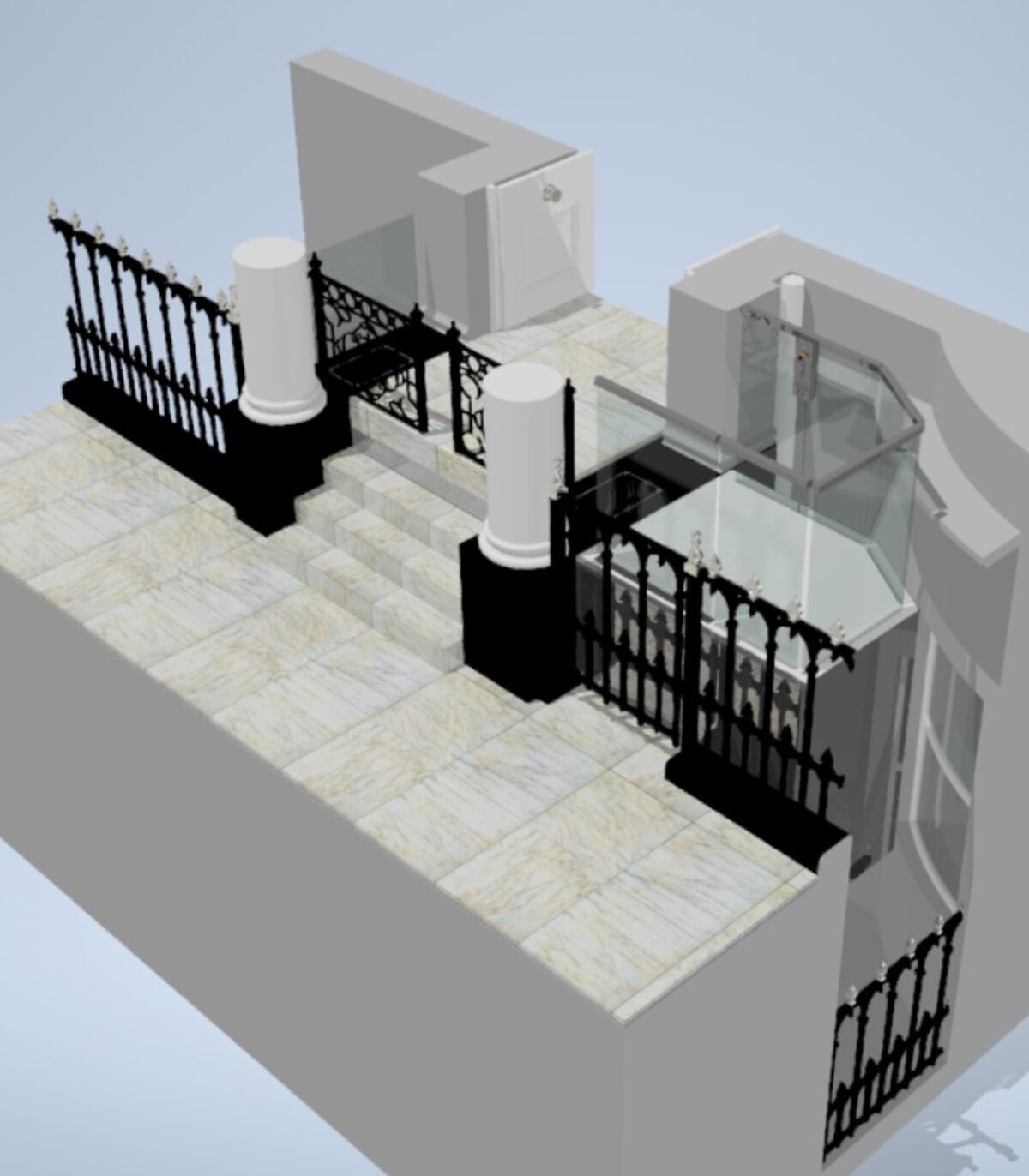
Open the 3D interactive model below to see for yourself
Introduction
Architect-led access projects often stall at the same point: understanding what is realistically possible within a constrained staircase.
Measured surveys, photographs, and written descriptions rarely communicate how a lift will sit, move, and interact with surrounding structure. Early-stage 3D staircase visualisation solves this problem by turning a complex site into a clear, navigable model that everyone can understand.
This approach builds on established workflows explained in 3D modelling in lift design and custom accessibility lift redesign, with a specific focus on rapid option testing for architects.
Best suited for
- Heritage buildings
- Listed properties
- Staircases with complex spatial constraints
- Projects with tight planning or programme deadlines
The problem: why staircase access decisions slow down
Staircases often combine limited depth, restricted headroom, surrounding structure, and strict visual requirements. Without a clear visual reference, early discussions rely too heavily on assumptions.
This uncertainty leads to:
- Slow decision-making
- Late objections from stakeholders
- Redesign once drawings are already underway
The solution: 3D staircase visualisation for architects
By converting a measured staircase survey into an interactive 3D model, different lift concepts can be explored quickly and realistically.
These models allow architects and consultants to see:
- Where the lift sits relative to the stairs
- How barriers, steps, and landings behave
- What changes between rest and operating positions
The model becomes a shared reference point for the entire design team.
Interactive and VR-ready model viewing
Each model can be issued with a link that allows users to explore it themselves. Viewers can rotate, zoom, pan, and hide elements to understand the site layout in detail.
You can explore the 3D model below.
Where appropriate, models can also be viewed using VR hardware to give a stronger sense of scale and spatial impact.
3D visualisation process
This section explains how we create 3D lift models in a clear, step-by-step workflow that architects can reference.
Step 1: Measured site survey
The staircase and surrounding area are measured on site to capture the geometry required for accurate modelling.
Step 2: Create the base 3D site model
The survey data is converted into a navigable 3D model representing the real staircase layout.
Step 3: Overlay lift options
One or more lift concepts are placed into the model to test feasibility and spatial impact.
Step 4: Generate staged screenshots
Key operating stages are captured as images to clearly explain how each option works.
Step 5: Issue interactive model link
An interactive link allows architects and stakeholders to explore the model independently.
Step 6: Progress to detailed drawings
Once an option is selected, the model informs site-specific drawings for planning, coordination, and structural review.
Model turnaround times
Early visualisation prioritises speed and clarity, allowing decisions to be made before detailed CAD work begins.
| Stage | Typical timeframe | Benefit |
|---|---|---|
| Site survey to first 3D model | 1 day | Rapid understanding of feasibility |
| 3D model with screenshots | Same day | Clear option presentation |
| Multiple option comparison | Rapid | Confident early decision-making |
| Traditional early CAD drawings | Often weeks | Slower iteration and higher risk |
Product options visualised in the model
The staircase models discussed typically explore several lift approaches, depending on constraints.
A side-positioned platform solution can align with the design intent behind the Windsor Lift, particularly where circulation space must be carefully managed.
Where discretion is critical, vertical retracting stair concepts may be explored using principles similar to the Wellington Lift.
For staircases requiring access for both seated and standing users, barrier behaviour and stair interaction can be demonstrated using concepts aligned with the Westminster Equality Act Lift.
Product integration summary
| Requirement | Example solution | Why 3D visualisation helps |
|---|---|---|
| Minimal visual impact | Wellington Lift | Shows stairs at rest and in use |
| Seated and standing users | Westminster Equality Act Lift | Demonstrates barrier sequencing |
| Side-positioned access | Windsor Lift | Confirms circulation and landings |
Planning and structural coordination
3D staircase visualisation supports earlier and more productive feedback from architects and structural engineers.
Instead of reviewing abstract drawings, teams can discuss a shared spatial model, allowing potential issues to be identified before detailed design begins. This reduces planning risk and improves confidence when progressing to formal submissions.
Frequently Asked Questions
Can 3D models show structural impact below ground level?
They help visualise spatial relationships and highlight potential conflict zones. Structural verification follows during detailed engineering.
How do interactive models help with listed building applications?
They allow stakeholders to understand the proposal clearly, reducing objections caused by uncertainty.
What file formats can architects receive?
Outputs typically include presentation images and interactive model links suitable for design team review.
Can models be used in design team meetings?
Yes. They are often used as a shared visual reference during coordination discussions.
Can barrier positions and operating stages be shown?
Yes. Models are captured in key operating stages to explain movement and safety clearly.
Are the models VR-ready?
Where supported, models can be explored using VR hardware for improved spatial understanding.
Does this replace detailed drawings?
No. It accelerates early decision-making before detailed drawings are commissioned.
How quickly can options be reviewed?
Initial models and options are typically available within a day of survey.
Can multiple options be compared for the same staircase?
Yes. This is one of the main advantages of the approach.
Do stakeholders need specialist software?
No. Interactive viewing is available through standard web links.
Next steps
If you want to explore staircase accessibility options quickly and clearly before committing to detailed drawings, book a Teams meeting with a Project Manager here:
https://www.sesameaccess.com/book-a-meeting